Night Club
Night Club is a game played together with viewers on a TikTok LIVE stream. Viewers join by commenting, sending gifts and liking.
How to play
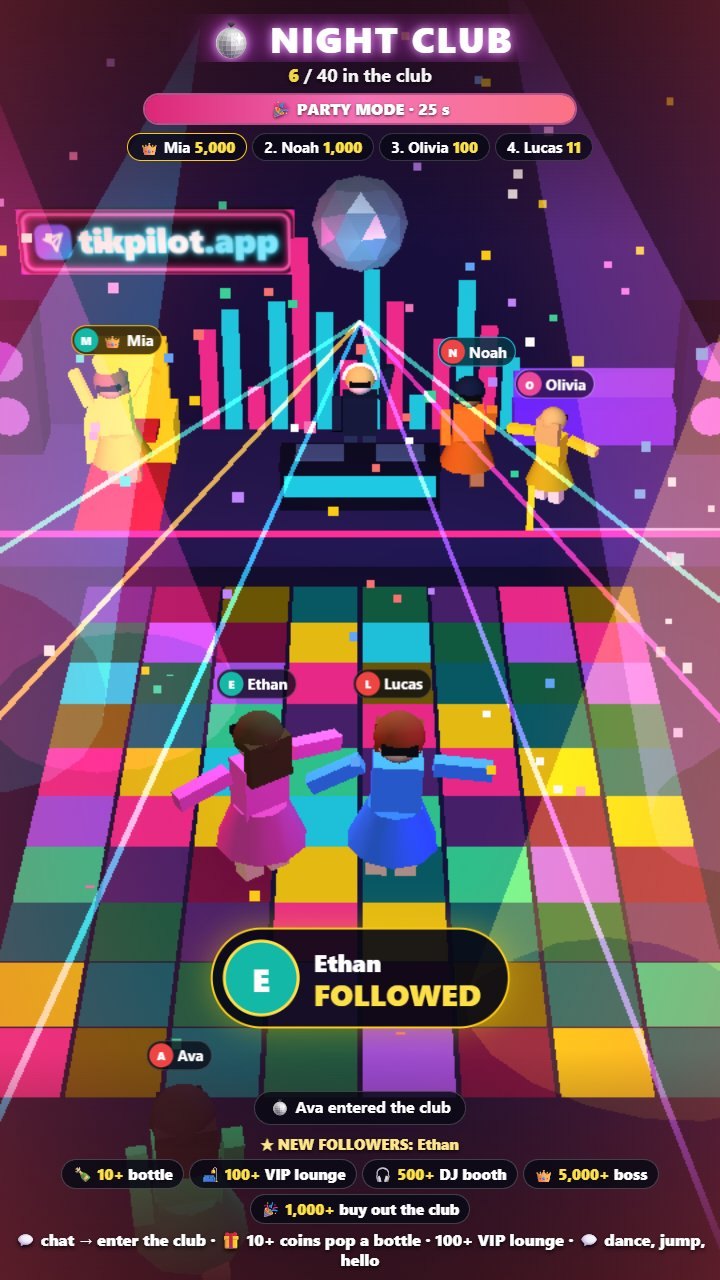
Your stream's night club: every viewer becomes a dancing figure on the floor with their name and profile photo. A comment, follow, likes or a gift gets them in. Gifters pop a bottle, move to the VIP lounge or next to the DJ, and the top gifter takes the boss throne and wears the king's crown. When likes fill the shared goal, party mode starts. People inside control their figure by typing dance, jump, hello, man, woman or a colour name in chat.
How viewers join
- Comments
- Gifts
- Likes
What you can set
Before you start it, you choose these in the panel:
- Venue name
- Entry to the club
- Entry command
- Entry by likes
- Max people in the club
- Like goal for party mode
- Coins to pop a bottle
- Coins for the VIP lounge
- and 4 more settings
How to add it to your stream
- Sign up for TikPilot, add your TikTok username and pick a plan.
- In the panel, open Night Club in the games list, choose its settings and start it.
- Add the link you are given to OBS as a browser source, or to TikTok LIVE Studio as a link source.
With pictures: How do you add games to a TikTok LIVE stream?
From the same group
Want to see it on your own stream?
Sign up and add your TikTok username. Once you pick a plan, every tool opens in the same panel.
Stuck somewhere? Write to [email protected].
Last updated:
TikTok is a trademark of ByteDance Ltd. TikPilot is not affiliated with TikTok.