Rescue Chopper
Rescue Chopper is a 3D game the streamer plays with keyboard and mouse; viewers change the game by sending gifts.
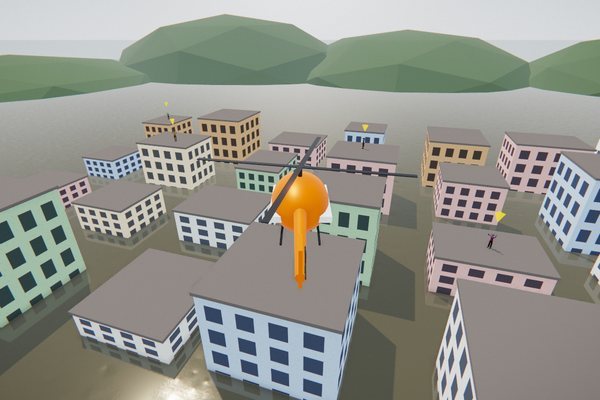
How to play
You fly a rescue chopper over a flooded town: hover slowly over a survivor on a roof and the winch lifts them; when the cabin is full or fuel runs low, land on the H pad on the hospital roof to drop them off and refuel; rescue the target number of people before time runs out. Viewer gifts bring a wind gust, rain, a fuel leak, a frayed cable, a storm and a flood wave that puts low roofs under water, or appear as a survivor with their name waiting on a roof, or send fuel, a fast winch, radar, a rescue boat with their name and a big chopper. Power comes from the coins sent; likes and follows help too.
How viewers change the game
- Every TikTok gift falls into a tier by its coin value: small gifts have small effects, big gifts have big ones.
- Some gifts help the streamer, others make the job harder; the strength of each effect comes from the coins sent.
- Likes, follows and shares give a little help too.
- A big gift brings a special moment on screen with the sender's name and photo.
The game goes stage by stage; after the last stage a harder new season begins.
How to add it to your stream
- Sign up for TikPilot and add your TikTok username.
- In the panel, open Rescue Chopper under Playable Games and press Play; the game opens in a new tab and connects to your viewers by itself.
- In TikTok LIVE Studio or OBS, add the game's window with Window capture. From the panel you can place the game full-screen vertical or in the lower part of the screen.
From the same group
Want to see it on your own stream?
Sign up and add your TikTok username. Once you pick a plan, every tool opens in the same panel.
Stuck somewhere? Write to [email protected].
Last updated:
TikTok is a trademark of ByteDance Ltd. TikPilot is not affiliated with TikTok.