Gift Timer
Gift Timer is a stream widget that sits on top of a TikTok LIVE stream. It works with gifts and likes.
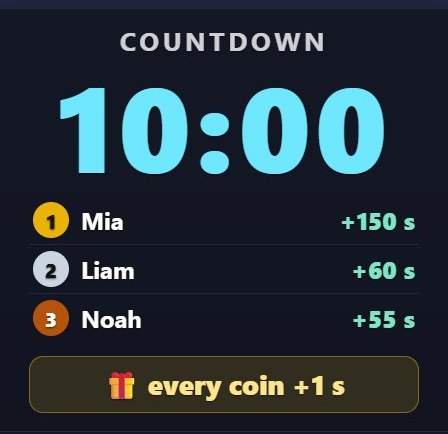
How it works
A countdown starts and every gift adds seconds to it, and likes can too. The viewers who extend it most are listed. The game ends when time runs out.
What it works with
- Gifts
- Likes
What you can set
Before you start it, you choose these in the panel:
- Title
- Starting time
- Seconds added per coin
- Added per 100 likes
How to add it to your stream
- Sign up for TikPilot, add your TikTok username and pick a plan.
- In the panel, open Gift Timer in the games list, choose its settings and start it.
- Add the link you are given to OBS as a browser source, or to TikTok LIVE Studio as a link source.
With pictures: How do you add games to a TikTok LIVE stream?
From the same group
🎁 GiveawayViewers enter by typing the keyword (or only gifters, if you prefer).🔔 On-Screen AlertsThe name and profile photo of a viewer who follows, shares the stream or sends a gift pop up on screen in a…💬 Chat BoxThe stream chat flows on your screen: the viewer's name, photo and message.🏅 Top GiftersThe viewers who send the most gifts during the stream are ranked with name, photo and coins; the latest…💗 Like MarathonThe viewers who like the most are ranked.🪙 Piggy BankEvery gift drops into the piggy bank as coins and adds up.All gamesThe list of 49 games and stream widgets.
Want to see it on your own stream?
Sign up and add your TikTok username. Once you pick a plan, every tool opens in the same panel.
Stuck somewhere? Write to [email protected].
Last updated:
TikTok is a trademark of ByteDance Ltd. TikPilot is not affiliated with TikTok.