Pixel Canvas
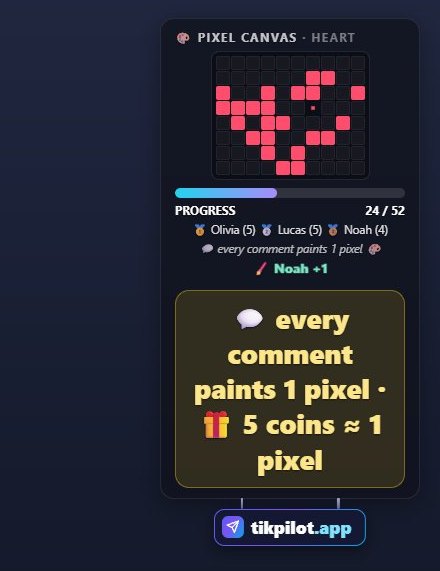
Pixel Canvas is a game played together with viewers on a TikTok LIVE stream. Viewers join by commenting and sending gifts.
How to play
Viewers paint a picture together: each comment paints 1 pixel, gifts paint more (5 coins ≈ 1 pixel, up to 50). When the picture is done, the top painter is the MVP.
How viewers join
- Comments
- Gifts
What you can set
Before you start it, you choose these in the panel:
- Picture
How to add it to your stream
- Sign up for TikPilot, add your TikTok username and pick a plan.
- In the panel, open Pixel Canvas in the games list, choose its settings and start it.
- Add the link you are given to OBS as a browser source, or to TikTok LIVE Studio as a link source.
With pictures: How do you add games to a TikTok LIVE stream?
From the same group
🛡️ Gift DefenseA shield with health appears on screen; each gift takes away as much health as its coins.🎱 BingoA bingo card whose squares you fill with things that might happen on stream.👹 Boss FightA monster boss appears on screen. Likes deal small damage and gifts deal big damage.🖨️ Gift PrinterThe printer on the desk prints every gift onto a paper card with the sender's name and profile photo.🐸 Jump TowerThe mascot starts at the bottom of the tower; every gift jumps it up by its coin value (small gifts add up)…🧹 Ball SweepThe room is full of balls and a vacuum is sucking them up. The goal is to empty the room.All gamesThe list of 49 games and stream widgets.
Want to see it on your own stream?
Sign up and add your TikTok username. Once you pick a plan, every tool opens in the same panel.
Stuck somewhere? Write to [email protected].
Last updated:
TikTok is a trademark of ByteDance Ltd. TikPilot is not affiliated with TikTok.